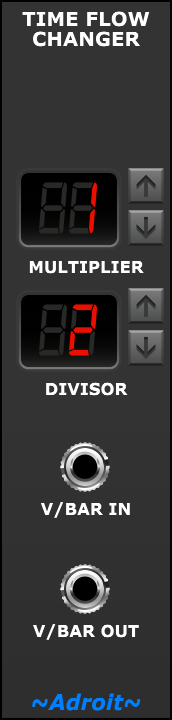
There is a simple timing relationship between most LSSP sequencers such as CV Sequencer and Rhythm Sequencer and the V/Bar signal used for their control input. A change in V/Bar voltage of one volt results in the sequencer running through one whole cycle and this corresponds to one bar.
The Time Flow Changer module allows this natural flow rate of a one volt per cycle/bar to be altered so that, for example, a sequence could run 8 times slower than normal by using a 1/8 setting or 5 times faster than normal with a 5/1 setting.
One could think of a Time Flow Changer as being rather like a clock divider / multiplier in a clock based sequencing system (but without some of the technical limitations.)
A fraction is used to allow us to make certain ratios more explicit and to allow for rate changes that can’t be expressed easily as a decimal number e.g. 1/3.
A minor downside of expressing things as fractions is that we can end up with expressions like 4/1 which seems a little unnatural compared with just 4, but it’s easy to learn to ignore the DIVISOR when it’s 1.
The range of time flow multiplication or division can vary from 99/1 (in other words 99 times faster than normal) down to 1/99 (or 99 times slower than normal). While simple fractions such as 2/1 or 1/2 perform simple doubling or halving it’s possible to enter all kinds of fractions including rather perculiar ones.
Note that because fractions are used there are generally multiple ways of expressing the same ratio. So in the screenshot below every Time Flow Changer module would act the same way.
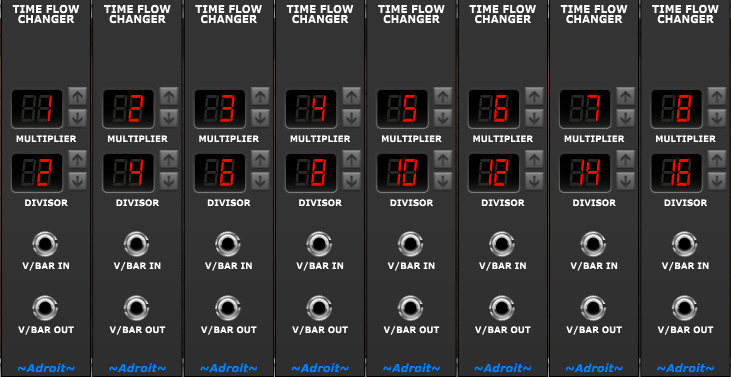
Note that when Song Control is in 4 beats per bar mode most LSSP sequencers have 16 steps so a 1/16 volt change maps to a change of 1 step. When Song Control is in 3 beats per bar mode most sequencers have 12 steps so a 1/12 volt change maps to a change of 1 step. So sometimes it makes sense to use 16 or 12 as the DIVISOR.
The time flow change is done by a relatively simple mathematical scaling operation on a V/Bar signal. Ultimately it’s just multiplication although because zero is used to indicate inactivity and 1 volt normally maps to the beginning of bar 1 then the actual math performed by this module involves subtracting and adding a 1 too.
Although you don’t reallly need to understand it, this module does the following…
V/BAR OUT = ( ( V/BAR IN – 1 ) * MULTIPLIER / DIVISOR ) + 1
As hinted at already one application for changing the flow rate is to break out of the 16 (or 12) steps per bar restriction and produce rhythmic patterns that won’t work with 16 or 12 divisions.
If we want to make a sequencer go through say 7 steps in a bar rather than the standard 16 steps (or 12 steps when Song Control is in 3 beats per bar mode) we can use a Time Flow Changer to multiply its V/Bar signal by 7/16 (or 7/12)
Although this changes the flow rate to 7 steps per bar the sequencer will still have a 16 step (or 12 step) cycle. Another module called the Time Cycle Changer allows us to change the cycle.
Note that the Groove module can also be used to alter the timing and number of steps for Rhythm Sequencers and Drum Sequencers by using step collapse but it doesn’t work with all V/Bar sequencers and often it’s better to use Time Flow Changer and Time Cycle Changer modules instead.
If we want a V/Bar sequencer to have a 7 step cycle and complete these 7 steps in a single bar then we need to change both the flow rate and the cycle. This can be done with a Time Flow Changer and Time Cycle Changer wired in series but there is also a Time Changer module that does this specific job with greater efficiency and ease of use.
Click here for a discussion on programming polyrhythmic and polymeteric sequences in LSSP.
Another application for a Time Flow Changer is to control the timing of a looping CV Sequencer that’s being used as a tempo-synced LFO with user-programmable waveforms as shown in the partial patch below.
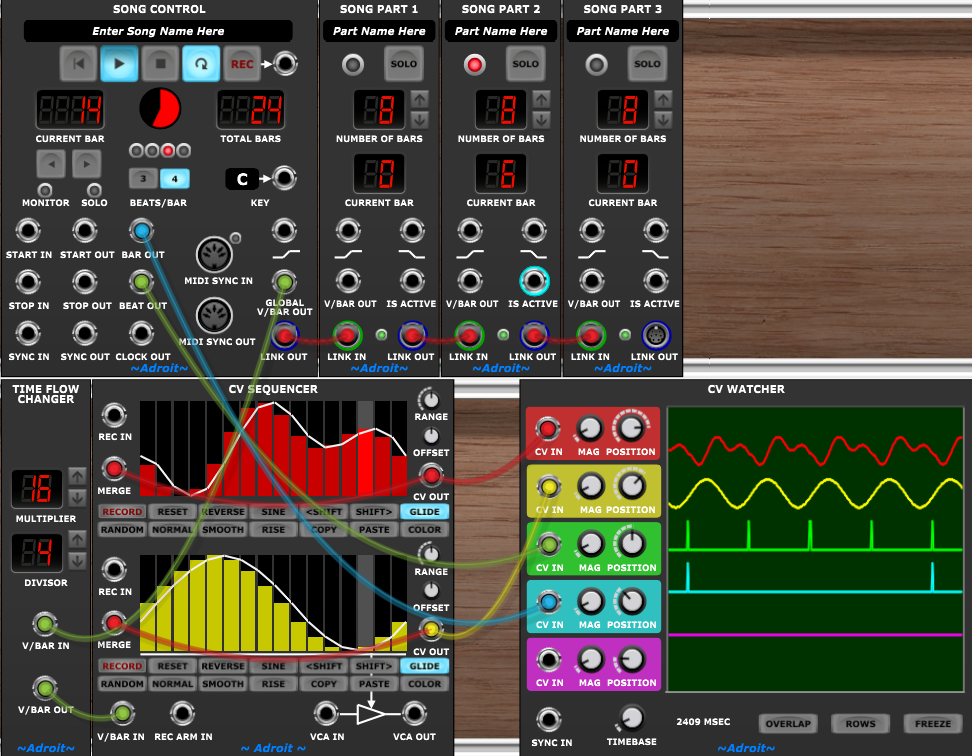
The V/Bar input for the Time Flow Changer signal is taken from the GLOBAL V/BAR OUT signal of Song Control rather than the V/BAR OUT of individual Song Part modules. The Song Parts aren’t doing anything useful in this little demo but would normally be sequencing other elements in a practical patch.
In this example the Time Flow Changer’s MULTIPLIER is 16. This means that the DIVISOR can then be set to the desired period (in 1/16 notes) of the tempo-synced “LFO”. In this case 4 is used so the period is a 1/4 note. A DIVISOR of 3 would give us dotted 1/8 sync, a DIVISOR of 2 would give us 1/8 sync etc.
The GLIDE buttons on the CV Sequencer’s channels are engaged so that their outputs produce smooth changes and because linear interpolation is used rather than slew limiting there’s no need to adjust anything to maintain the same slopes at different speeds.
Note that feeding the CV OUT signal from a CV Sequencer channel back to the channel’s MERGE input enables the glide to interpolate between the last and first step when looping.
Another similar application involves running CV Sequencers at slower than normal rates to create control signals similar to automation curves in a DAW.
16 steps is probably too short a sequence length for this application so sequencer chaining can be used to extend the number of steps as required.
Here’s a partial patch showing this technique…
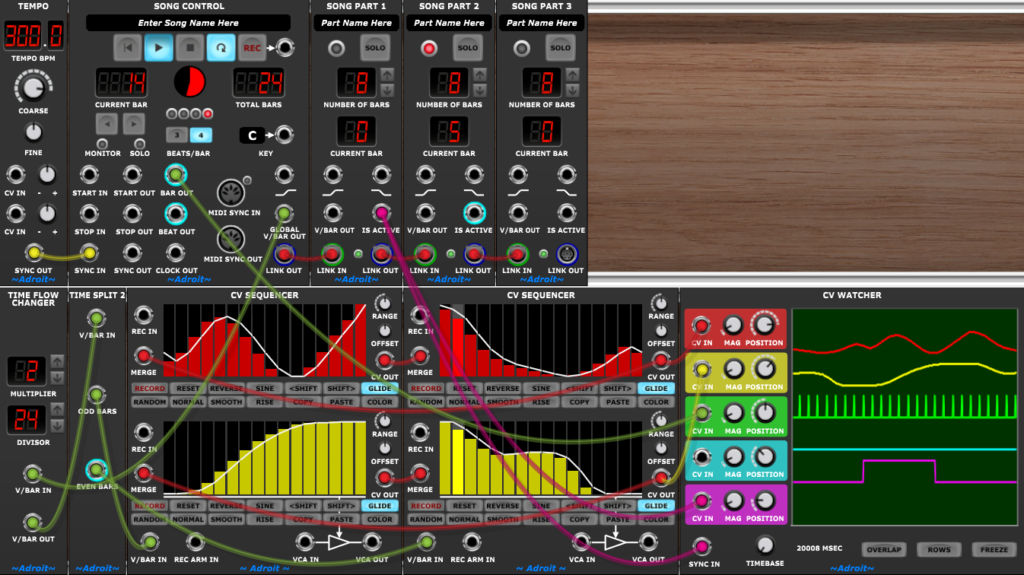
Here the MULTIPLIER is set to the number of CV Sequencers in the chain and the DIVISOR is set to the number of bars in the song.
In both of the tempo synced LFO and automation applications you’ll find that the CV Sequencer’s SMOOTH and NORMAL button functions come in handy.
Another application for changing flow rate is getting the outputs of a Triggers module to trigger per bar rather than per step.
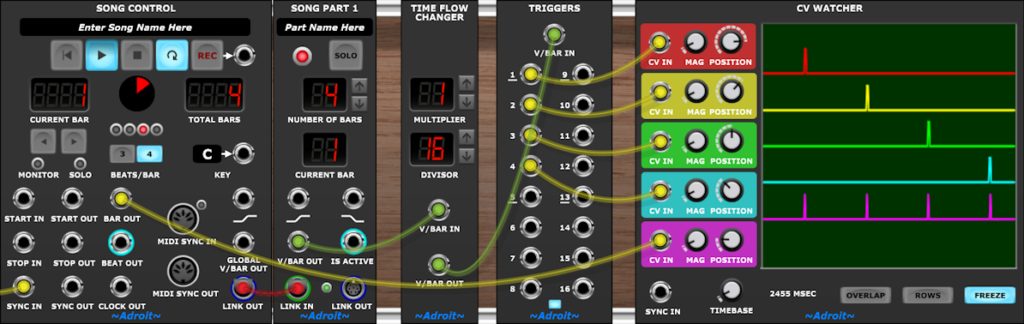
Because V/Bar sequencers don’t have an internal “count state”, when you change their time flow they always keep properly in-sync. In contrast conventional clock-based sequencers will usually get confused if you alter the setting of any clock divider/multiplier that’s feeding them and will require a reset in order to get back into synchronization.
Although this module is usually inserted just before the V/Bar input of a sequencer or a chain of sequencers it can be inserted anywhere in a V/Bar patch. This can open up new possibilities with Time Splitters. For instance a Time Split 2 module will split on half bars rather than full bars if fed with a V/Bar signal with a doubled flow rate.
One approach that can lead to all kinds of happy accidents and discoveries is to insert Time Flow Changers at strategic points in an LSSP patch just before Progression and Rhythm Sequencer chains and experiment with things like doubling or halving the speed of chord changes, the lead melody or bass line. Sometimes one can discover that say slowing down the bass and speeding up the rate of chord change produces an unexpectedly good outcome.
Availability
The Time Flow Changer module is part of LSSP XL.