If we have two different repeating patterns playing simultaneously and one has say 6 equally spaced steps and the other has 9 equally spaced steps then if both patterns complete in the same amount of time then this is called a polyrhythm. For both patterns to complete in the same amount of time then the step duration of the pattern with 6 steps must be longer than the step duration of the pattern with 9 steps.
But if both patterns have identical step durations then this is called a polymeter. For both patterns to have steps that last the same amount of time then the total duration of the 9 step pattern must be longer than the 6 step pattern.
So in a polyrhythm the step lengths are different but the cycle period is the same while in a polymeter the step lengths are the same but the cycle periods are different.
In the case of 6 step and 9 step patterns the ratio is 6/9 (which as a fraction can be simplified to 2/3). So in a polyrhythm the step of the 9 step pattern must be two thirds of the length of the step of the 6 step pattern and in a polymeter the 6 step pattern must last two thirds of the time that the 9 step pattern does.
In the polymeter case if the patterns begin in sync on the first step then because they have different cycle lengths they will go out of sync for a while. We can determine how many steps occur before both patterns return to synchronisation by finding the least common multiple of 6 and 9. This is 18 steps.
Given that most V/Bar sequencers have 16 or 12 steps that cycle in one bar how do we implement polyrhythmic and polymetric sequencing in LSSP?
For the sake of simplicity we’ll use CV Sequencers as these always have 16 steps regardless of the Song Control module’s BEATS/BAR setting but the same techniques apply to other V/Bar sequencers.
Polymeter Demo
In both the polyrhythm and polymeter cases we want one sequencer to cycle through 6 steps and the other to cycle through 9 steps so we can use a couple of Time Cycle Changer modules to change the cycle of a V/Bar signal fed to each sequencer.
So our initial patch looks like this…
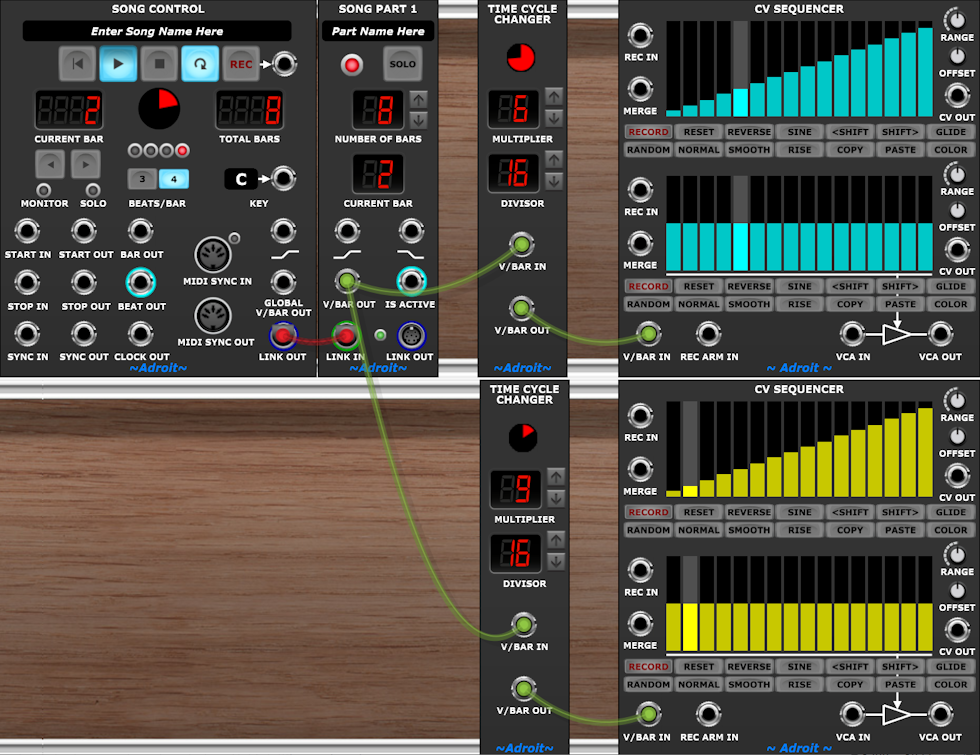
For polymetric sequencing this is essentially all that is required, so let’s turn it into a crude practical demo patch that we can listen to.
Open the .voltagepreset file to launch Voltage Modular then click on the Song Control module’s Play button.
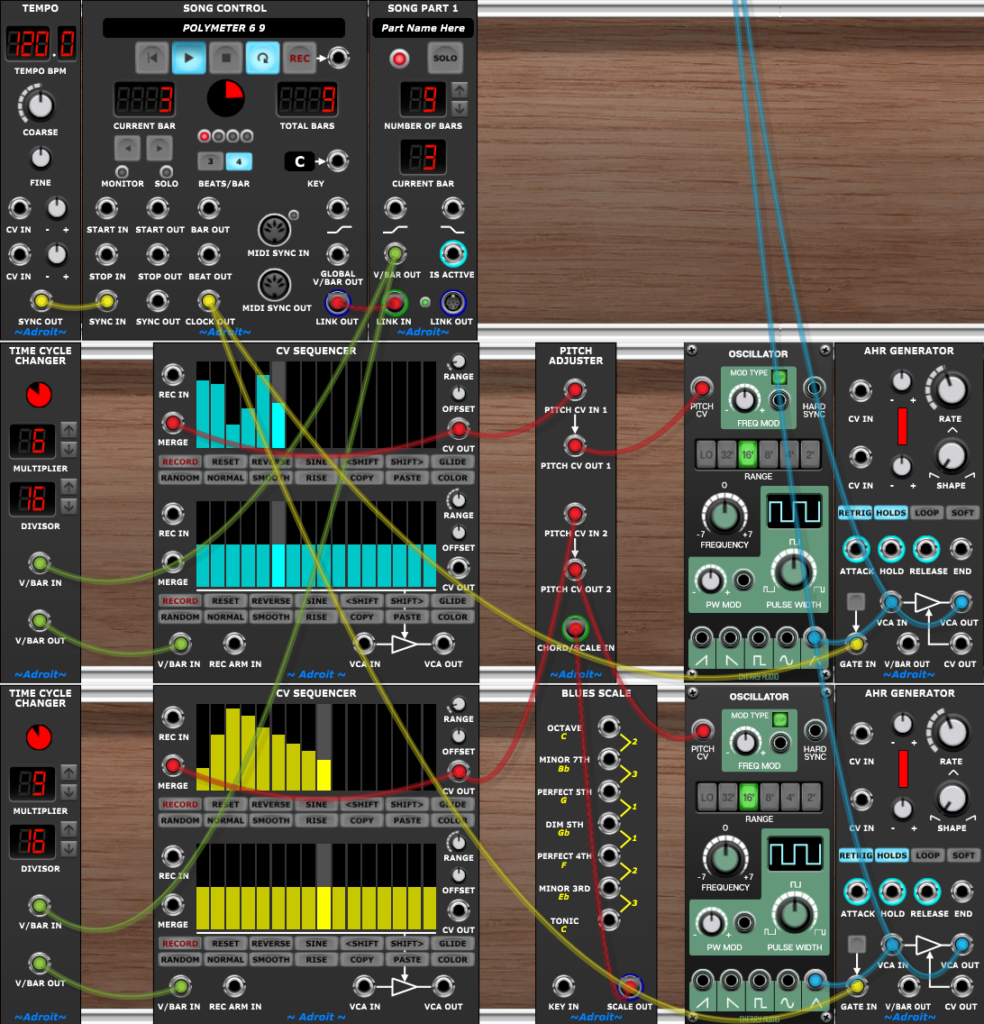
The 6 step pattern is audible via the left stereo output and the 9 step pattern via the right output.
You can experiment with other polymeters by changing the MULTIPLIERS on the two Time Cycle Changers.
The range of the CV Sequencer channels is reduced to 1.5 volts so that the maximum pitch range is one and a half octaves and a Pitch Adjuster is used to quantize the notes to a Blues Scale to help reduce the dissonance caused by two unrelated pitches playing together.
Because in a polymeter both patterns have the same step rate then the gate for both voices comes from the Song Control’s CLOCK OUT socket – which produces the 1/16 note clock required.
Although the 6 against 9 polymeter repeats every 18 steps there’s another cycle involved – which is how many bars one loop of the song takes. Initially the Song Part module was set to have 8 bars which meant that the V/Bar reset every 128 steps (8 times 16), but 128 isn’t a multiple of 18 so there was a slight “hiccup” every 8 bars. To not have a hiccup we need to find the least common multiple of 6, 9 and 16. The easiest way to find this is to type “LCM 6 9 16” into Google which will come back with the answer 144. We can then divide 144 by 16 to find the number of bars which gives us 9. So if we set the Song Part’s NUMBER OF BARS to 9 the hiccup disappears.
In realistic songs that use polymeter you may not always need to worry about perfectly matching all of the cycles either because you are fading out ostinatos or you just accept that some polymetric patterns truncate (there’s no rule saying you can’t truncate). But by knowing about LCM you can attempt to find non-truncating solutions with Google if required.
Polyrhythm Demo
For polyrhythmic sequencing we need to adjust the step duration for each sequencer as well as the cycle. We can do this by adding a couple of Time Flow Changer modules patched before the Time Cycle Changers.
The ratios for changing the time flow are exactly the same as for changing the cycles – 6/16 and 9/16.
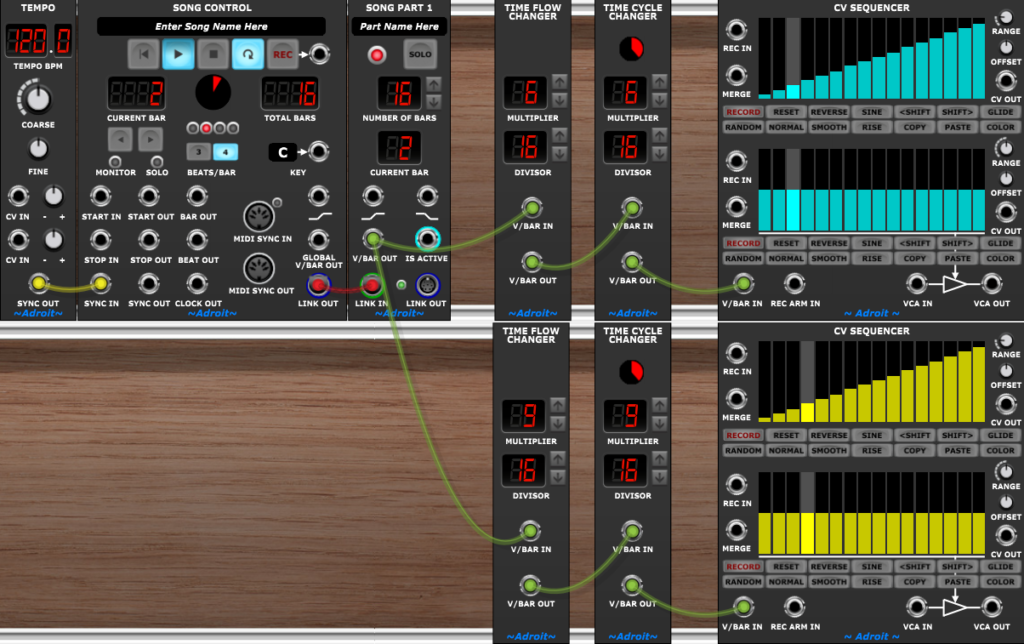
Using Time Flow Changers in series with Time Cycle Changers works fine but there’s a more convenient solution in the form of Time Changer modules.
Using a Time Changer instead of a Time Flow Changer and a Time Cycle Changer pairing, saves a module and a cable and means only one MULTIPLIER and one DIVISOR needs setting.
As before let’s turn the basic patch into something we can listen to.
Open the .voltagepreset file to launch Voltage Modular then click on the Song Control module’s Play button.
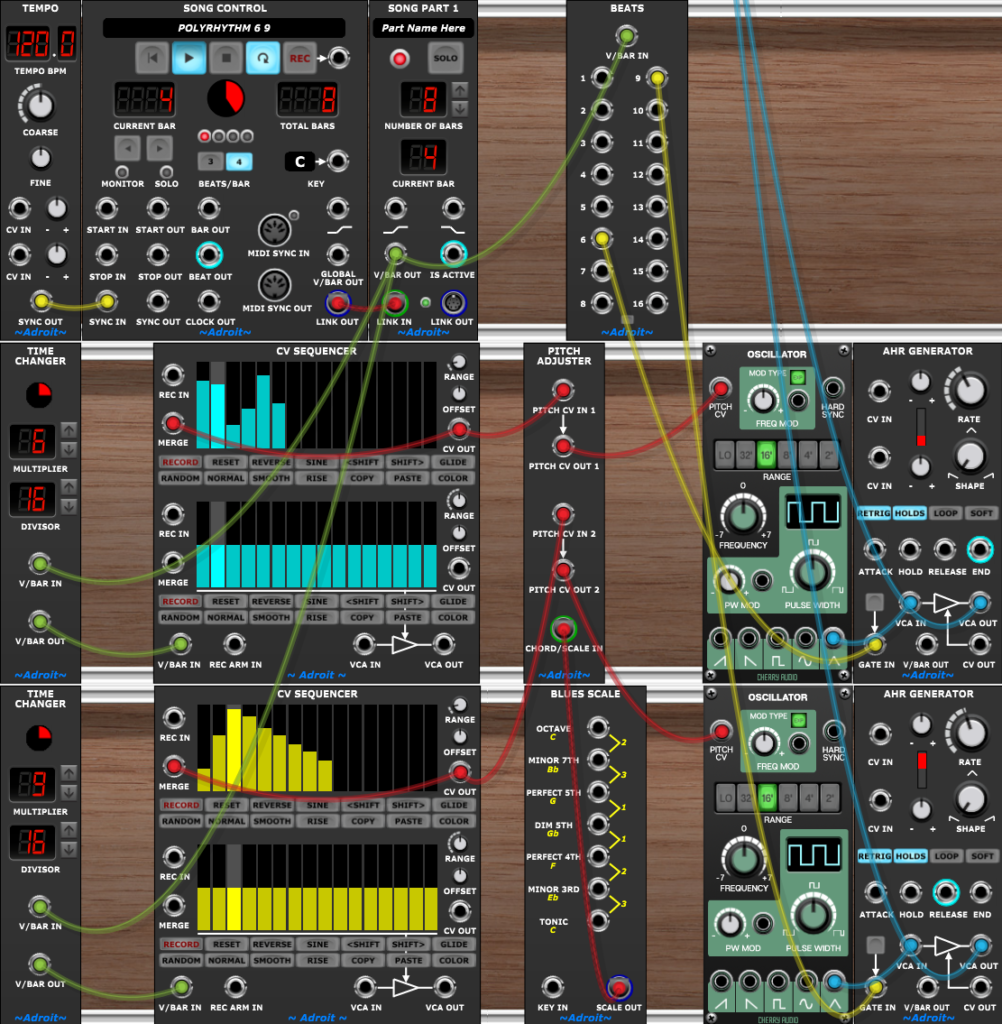
As you can see the Polymeter Demo and Polyrhythm Demo are very similar. The important difference is that the former uses Time Cycle Changer modules and the latter uses Time Changer modules.
But also as the step durations differ in the polyrhythm demo we need two different clock streams to gate the envelopes. The easiest way to do this is use a Beats module as this has the required 6 and 9 beats per bar trigger outputs.
You can experiment with different polyrhythms by changing the MULTIPLIERS on the two Time Changers and using matching outputs from the Beats module.