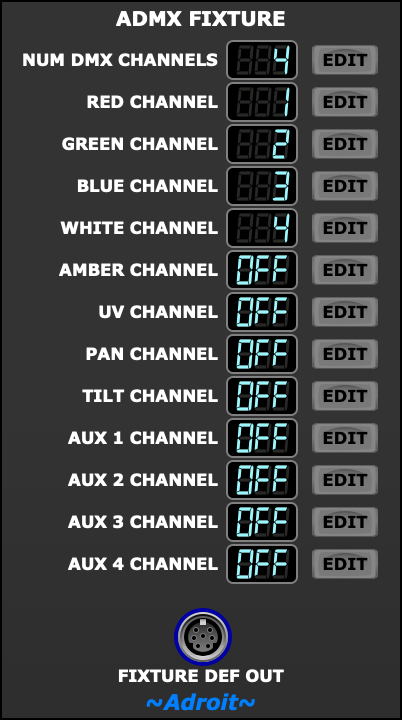
This module lets you describe the important characteristics of a DMX lighting fixture so that the ADMX system can control fixtures of this type.
To configure this module you’ll need the documentation shipped with the fixture. This documentation will include a menu function table and one or more other tables where the left most column lists channel numbers and the other columns give a descrition of what each channel does.
One tip is to photograph this documentation so that you have a backup copy as it’s quite easy to misplace a small booklet or flimsy piece of paper. This might be especially useful if you buy budget/generic fixtures as it might not be possible to find specific details for unbranded models on the internet.
Typically a fixture will have a couple of different channel modes listed in its menu function table. For example an RGBW PAR can might have a 4 channel mode that gives access to the most basic parameters and an 8 channel mode that offers more facilities.
You’ll be able to select which mode to use using the fixture’s buttons (usually labelled MENU, UP, DOWN and ENTER). Often the simplest mode is sufficent.
Most RGBW PAR cans will have a 4 channel mode that is mapped as follows…
| Channel | Range | Function |
| 1 | 0 – 255 | Red Intensity |
| 2 | 0 – 255 | Green Intensity |
| 3 | 0 – 255 | Blue Intensity |
| 4 | 0 – 255 | White Intensity |
This is so common that it’s the ADMX Fixture module’s default setting.
When the default isn’t what’s required then begin by clicking on the EDIT button to the right of NUM DMX CHANNELS and selecting the number of channels supported by the fixture mode you wish to use. You can then then click on the other EDIT buttons to select the address for each function.
For instance some RGBW PAR cans might assign white to channel 1 instead of 4 so you might need to set red to 2, green to 3 and blue to 4.
A moving head fixture will have use far more channels than a PAR can but the same principles apply.
The information for all the channels is encoded in a special S-Poly signal that’s sent to the FIXTURE DEF OUT socket. This can then be connected to one or more of the FIXTURE DEF INPUTS on an ADMX Rig Definer module.
See the ADMX Rig Definer module’s documentation for more information.