See ADMX for an overview of the ADMX system.
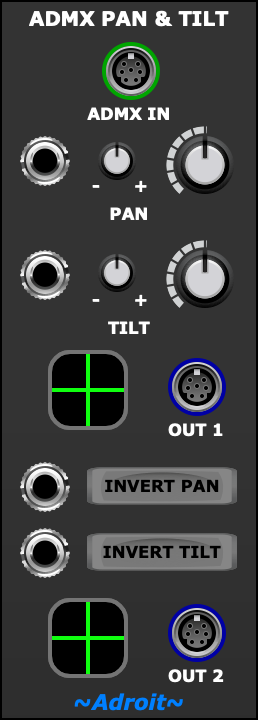
This module sets the Pan and Tilt channels in an ADMX signal, thus providing a mechanism for controlling the direction that a moving head fixture points.
A secondary output is provided that can mirror the motion but with either or both the horizontal and vertical directions reversed.
Remember that moving heads can’t respond instantly to changes in pan and tilt. If you send them signals that exceed their mechanical abilities then they’ll not explode but the end result might not be what you expect.
Check the documentation that came with your fixtures to see if they have a DMX channel called something like velocity. If so use an Aux channel to control this as you may find that tweaking this parameter produces smoother or more responsive operation. There might be separate channels available for pan and tilt velocity.
Another feature that you might find useful on some moving heads is an ability to adjust their pan and tilt rotation ranges. The default is probably the maximum range available but lower settings can be useful especially if you know that the distance between the fixture and its intended target is significant. By setting a smaller rotation range the effective rotational resolution increases. Such range settings will probably not be adjustable by DMX but be accessed via the fixture’s physical MENU button.
Table of Contents
ADMX IN
If an ADMX signal is fed to the ADMX IN socket then the module passes on the signal’s Hue, Saturation, Brightness, Aux 1, Aux 2, Aux 3 and Aux 4 information to OUT 1 and OUT 2 but replaces any Pan and Tilt information with internally generated values.

If nothing is connected to the ADMX IN socket then the Hue, Saturation, Brightness, Aux 1, Aux 2, Aux 3 and Aux 4 channels in the outputs are zero volts.
So an ADMX Pan & Tilt module can be placed at any point in an ADMX signal path. For instance if you wanted two moving heads to point in the same direction but have different colors then a single ADMX Pan & Tilt module could feed the ADD IN sockets of two ADMX Color modules.
Pan
The pan part of the module controls the pan (horizontal rotation) channel.

The large knob provides a base pan value. The small knob is an attenuvertor that controls the amount of modulation added to the base value when an external CV is fed to the socket on the left. When the attenuverter knob is at 12 o’clock there is no modulation, when set clockwise the modulation is positive, when set counter clockwise the modulation is inverted.
The outer dial of the large knob shows the result of adding external modulation to the base value.
Tilt
The tilt part of the module controls the tilt (vertical rotation) channel

Just like the pan section there’s large knob setting a base value, an attenuverter and an external modulation input.
OUT 1
The OUT 1 socket outputs an ADMX signal with pan and tilt values set according to the pan and tilt mechanisms descibed above. If the ADMX IN socket is connected then the Hue, Saturation, Brightness, Aux 1, Aux 2, Aux 3 and Aux 4 values are taken from there otherwise these channels are set to zeo volts.

To the left of the OUT 1 socket there’s a preview that uses green crosshairs to show the pan and tilt values.
OUT 2
It’s often useful to drive pairs or groups of moving heads in tandem fashion. Either with them all pointing in the same direction or there being either horizontal or vertical mirroring. Therefore a second output is provded that is derived from OUT 1 but with options to invert the direction of pan and/or tilt.
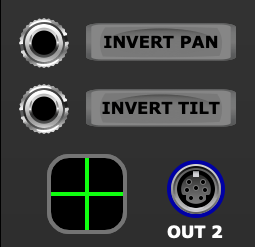
A second preview with crosshairs makes it obvious what differences if any there are between OUT 1 and OUT 2.
When an INVERT button is engaged then the pan or tilt of OUT 2 will be in the opposite direction to OUT 1.
The sockets to the left of the INVERT buttons allow the inversion to be voltage controlled by gate signals. A high gate signal inverts the effect of the respective INVERT button.