
A simple module intended to be used in conjunction with the fade signals provided by Song Part modules to automatically fade in and/or out audio (or control voltages) at key points in a song.
It’s effectively two VCA’s wired in series and the same job could be done with a Dual VCA module but the Fader module is more compact, easier to use and more efficient (as common cases are handled optimally).
The GAIN LED at the top indicates the proportion of the signal fed from the INPUT socket to the OUTPUT socket.
The input sockets with squiggle legends are for the fade control voltages.
If you just want a fade in then connect the top one to the matching output of the Song Part module that you want to control the fade in.
If you just want a fade out then connect the bottom one to the matching output of the Song Part module that you want to control the fade out.
The CV inputs have symmetrical behaviour but it helps with tracing the cables if you use matching labels.
If you want a fade in and later a fade out then connect each socket to the matching outputs of the Song Part modules that you want to control the fading.
If neither socket is connected then the INPUT is fed directly to the OUTPUT.
The patch shown below fades in the snare over bar 1 through 4 and the hats over bar 5 through 8 and fades out the snare over bar 9 through 12 and hats over bar 13 through 16.
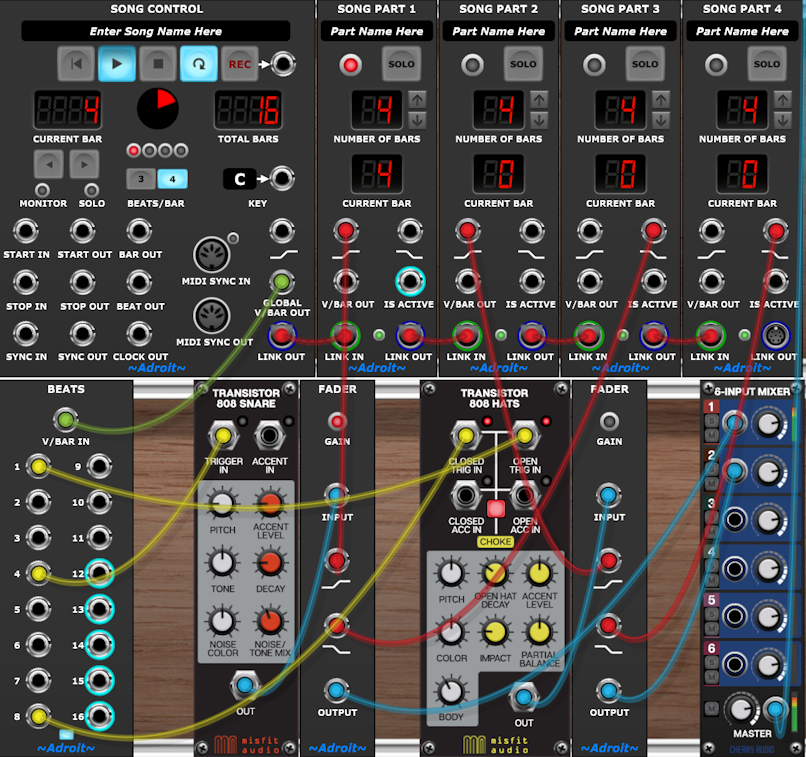
If you want to fade a signal in and out multiple times during a song then connect several Fader modules in parallel.
If you want to fade in and/or fade out a stereo signal then a Stereo Fader module is provided that is more effective than using a pair of mono Fader modules as it uses less space, less CPU and requires fewer cables.
Availability
The Fader module is only available as part of LSSP XL.