Each module has a “build number” that is effectively a version number.
To find the build number right click on a blank area of a module to display the following menu…
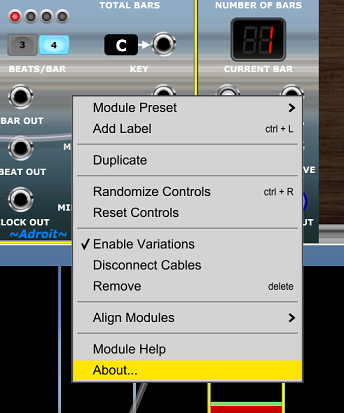
Select the About… option. This will pop-up something like the following display…

In the example screen shot above the Song Control module’s build number is #56.
The list below shows the current build numbers for all Adroit modules. You can use it to check that any particular module on your computer is the most up-to-date version available.
| AHR Generator | #29 |
| Bar Watcher | #9 |
| Beats | #4 |
| Blues Scale | #27 |
| Chord | #16 |
| Chord From Scale | #8 |
| Chord Memory | #23 |
| Chord Player | #27 |
| Chromatic Scale | #22 |
| Custom IO | #25 |
| Custom Look | #30 |
| Custom Panel | #124 |
| Custom Scene Manager | #13 |
| Custom Scene Trigger | #2 |
| Custom Transport | #9 |
| CV Sequencer | #41 |
| CV Watcher | #18 |
| Diatonic Triads | #26 |
| Drum Sequencer | #20 |
| Dual Track & Hold | #3 |
| Dual VCA | #18 |
| Eight to One Poly Switch | #7 |
| Fader | #4 |
| Granular Synth | #117 |
| Granular Synth Breakout | #26 |
| GS MIDI X | #10 |
| GS Multiplex | #26 |
| Groove | #55 |
| Hit | #5 |
| Inversion | #13 |
| Knob and Button | #2 |
| Major Scale | #24 |
| Melody Sequencer | #65 |
| MIDI Compensator | #17 |
| MIDI Drum Kit | #27 |
| MIDI Panic | #16 |
| MIDI Patch | #27 |
| MIDI Trap | #7 |
| Minor Scales | #24 |
| Modal Scales | #9 |
| Mono To S-Poly | #16 |
| N-Step Aux | #113 |
| N-Step Main | #139 |
| N-Step Remote | #3 |
| Named Multiple | #31 |
| Note Watcher | #24 |
| Octaves | #8 |
| Pitch Adjuster | #14 |
| Progression | #32 |
| Rhythm Sequencer | #99 |
| Router | #4 |
| Router Outputs | #4 |
| S-Poly Adapters | #19 |
| S-Ply To Mono | #12 |
| Sample & Hold | #10 |
| Scala Scale | #3 |
| Scratch | #8 |
| Song Control | #64 |
| Song Part | #52 |
| Stereo Fader | #3 |
| Tandem | #5 |
| Tempo | #15 |
| Tilt | #2 |
| Time Changer | #1 |
| Time Cycle Changer | #5 |
| Time Flow Changer | #8 |
| Time Split 16 | #11 |
| Time Split 2 | #58 |
| Time Split 4 | #14 |
| Time Split 8 | #12 |
| Time Split Binary | #17 |
| Time Split Break | #10 |
| Time Split Build | #11 |
| Time Split Fills | #13 |
| Time Split Random | #6 |
| Triggers | #4 |
| Variables | #29 |
| Variables Manager | #9 |
| Variable Outputs | #25 |
| V/Bar Utility | #13 |